Prompting for Agents: Practical Insights from the Claude Code Team
This article draws on a Claude team Open Day session, together with my own framework for writing prompts for real-world agents. If your team is building agents and designing production prompts, I hope this gives you something practical to use.
My Practical Framework for Building Agent Prompts
Before getting into the Claude team's ideas, I want to share the framework I have converged on over the past few months.
I increasingly think that writing prompts for agents is a lot like drafting a legal system. A good legal system works because it has hierarchy, precision, interpretability, and enough flexibility to handle edge cases. A strong agent prompt should do the same.
In practice, I break an effective agent prompt into six parts:
- Role definition
- Core principles
- Action space
- Specific rules
- Few-shot examples
- Absolute prohibitions
This structure is partly inspired by Stanford's 2023 paper Lost in the Middle: How Language Models Use Long Contexts. The core finding is that models tend to perform better when critical instructions appear at the beginning or the end of the context, and worse when those instructions are buried in the middle. The pattern resembles the serial-position effect in psychology.
That is why I usually place the most important instructions, such as role, core principles, and hard constraints, near the very front or very end of the prompt.
Role Definition
This section defines the agent's identity, purpose, and reason for existence. A clear role helps the agent understand what it is fundamentally responsible for.
- Purpose: Why does this agent exist? What problem is it supposed to solve?
- Identity: Give the agent a concrete persona or professional frame so it can better infer tone and behavior.
- Capability boundaries: Explicitly define what it can and cannot do to avoid overreach.
- Task definition: State the concrete objective and the expected outcome in concise language.
Core Principles
These are the constitutional layer of the prompt. They guide the agent even when there is no rule for a specific edge case.
Common examples include:
- Consistency: Similar requests should produce similar behavior and output.
- Accuracy: The agent should avoid fabricating information or guessing without basis.
- Relevance: Responses and actions must stay tightly aligned with the user's actual request.
Action Space
This section defines the tools or actions available to the agent. The goal is not just to list tools, but to clarify when each tool should be used. Done well, this helps the agent understand the boundaries of its capability and choose the right action under uncertainty.
Specific Rules
These are the detailed laws of the system. They define the required behavior for particular scenarios.
Typical examples include:
- Formatting requirements
- Tone and style
- Interaction pattern
- Decision rules for specific workflows
Few-Shot Examples
This is the case-law layer. Examples are often more effective than abstract rules because they show the agent how to interpret and respond to a specific class of request.
- Positive examples: What good behavior looks like
- Negative examples: What the agent should avoid
- Tool-use examples: Which tool to call, and what arguments to pass, in which situation
Absolute Prohibitions
This is the strictest part of the prompt. These are hard red lines the agent must not cross.
Typical examples include:
- Outputting the wrong format
- Generating harmful content
- Giving illegal or unsafe advice
- Violating the most important principles defined earlier in the prompt
What Is an Agent?
What exactly is an agent?
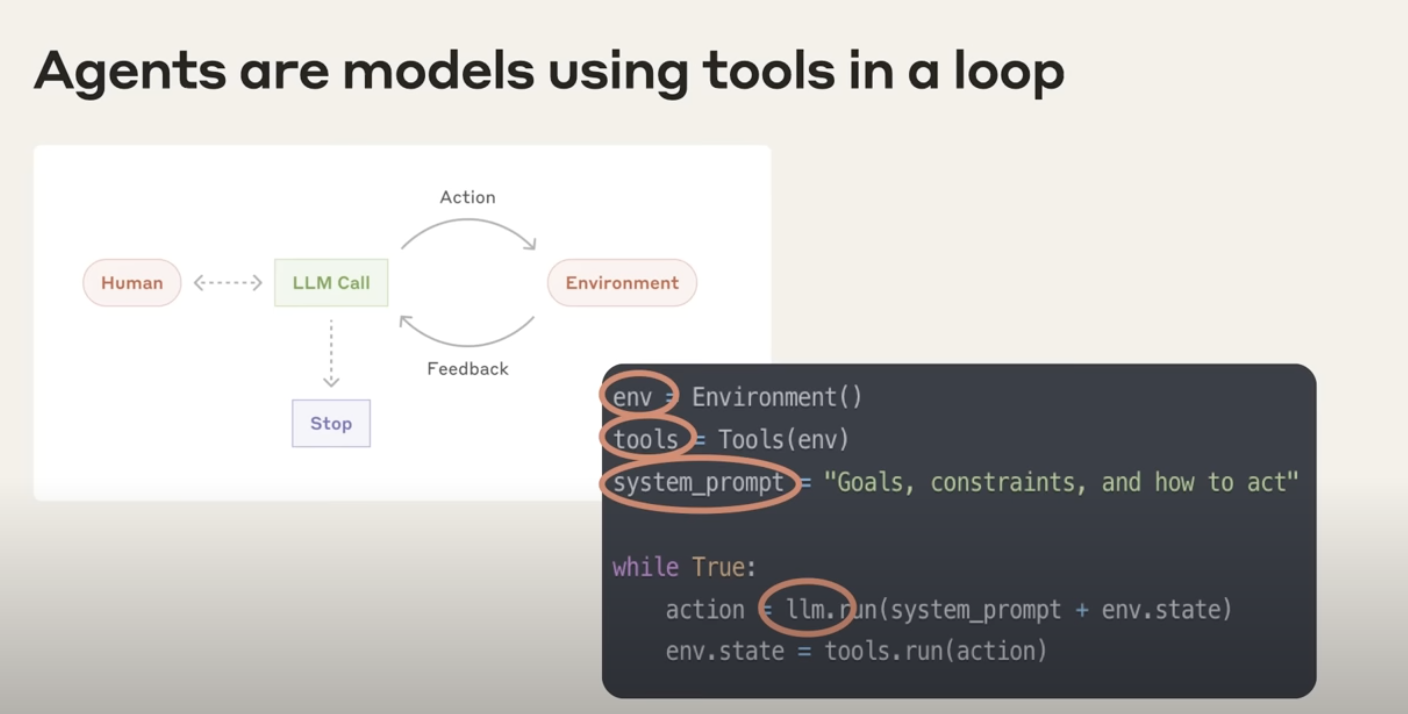
At its core, an agent is a model that can use tools autonomously inside a loop. That is the definition Anthropic uses internally.
"At Anthropic, we like to say that agents are models using tools in a loop."
An agent works like this:
- You give it a high-level goal.
- It continues working on its own and chooses tools when needed, such as APIs or databases.
- It updates its judgment based on what those tools return.
- The loop continues without human intervention until the task is done.
Three ingredients define an agent:
- Environment: The world in which the agent operates
- Tools: External capabilities the agent can use
- System prompt: The goal and governing rules that guide its behavior
"And we typically find the simpler you can keep this the better. Allow the agent to do its work. Allow the model to be the model."
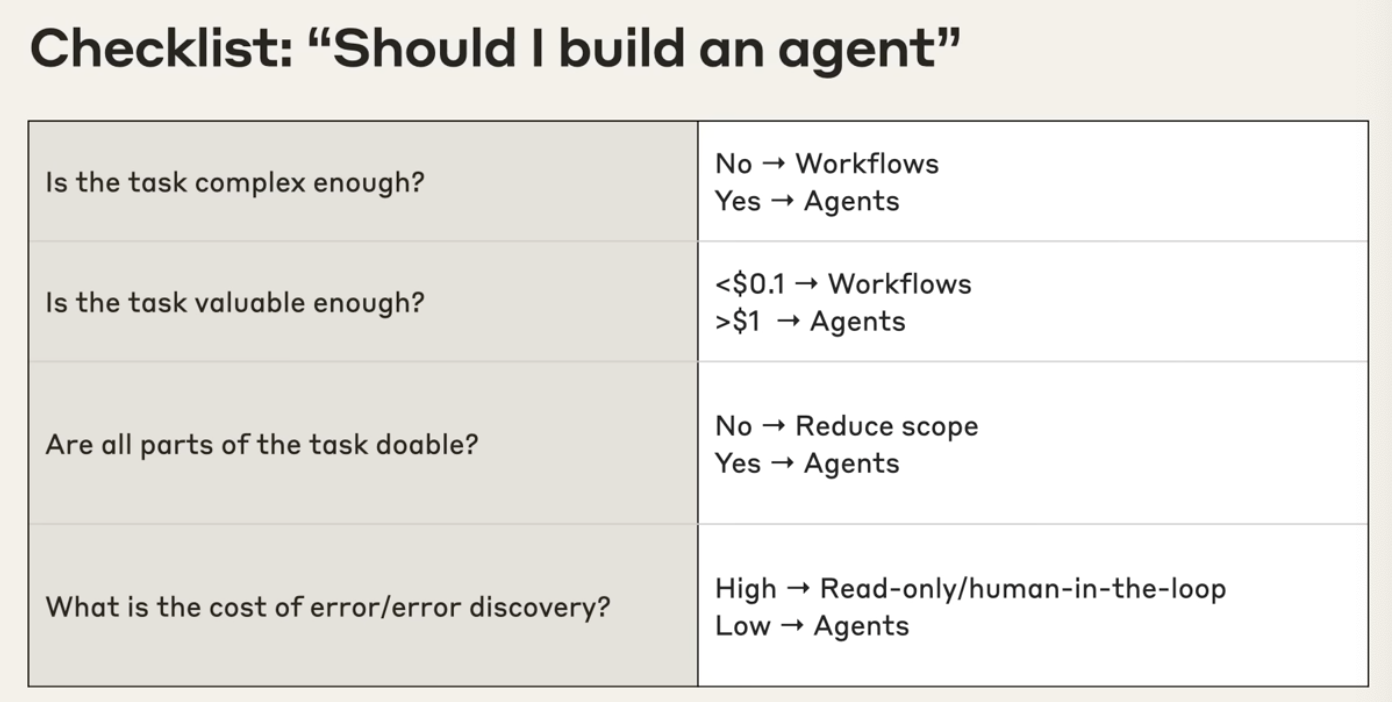
When should you use an agent, and when should you not?
Deciding whether to build an agent deserves caution. Agents are best suited for complex, valuable tasks. If you use them in the wrong setting, you waste time, money, and system complexity.
Use the following checklist:
Is the task complex enough?
- No: Consider a workflow instead. If the path is fixed, predictable, and a human can easily lay out each step, a workflow is usually more efficient and cheaper.
- Yes: Agents are a good fit when the goal is clear but the path is not. You know where you want to go, but not exactly how to get there.
Is the task valuable enough?
- Low value: Do not spend agent resources on work worth almost nothing.
- High value: Agents should be applied to highly leveraged tasks, such as work that drives revenue or produces major user value.
Are all parts of the task actually doable?
- No: Narrow the scope. If you cannot define the tools and information the agent needs, the problem is probably still too broad.
- Yes: If you can clearly define the required toolset, the task is much more viable as an agent.
What is the cost of error, and how hard is error discovery?
- High cost: Use read-only behavior or keep a human in the loop.
- Low cost: If errors are easy to detect and easy to undo, the task is a better fit for autonomous execution.
Use-Case Value Analysis for Agents
| Use Case | Complexity and Ambiguity | Value | Viability | Cost of Error |
|---|---|---|---|---|
| Coding | High. Going from a design doc to a PR is not a fixed path. | Very high | Claude is already very strong at coding tasks. | Easy to validate with unit tests and CI |
| Search | High. Multi-step and ambiguous | Medium to high. Can save hours of research time | Search tools combined with Claude work extremely well | Low if you can cross-check with citations |
| Computer Use | High. Requires navigating interfaces autonomously | Medium. Typical RPA tasks can each be worth meaningful money | Sonnet is strong when operating with screenshots and clicks | Often reversible |
| Data Analysis | High. The contents and route are not known in advance | Medium | Claude is strong at text-to-SQL and lightweight analysis | Usually manageable if results are cross-checked |
Prompting for Agents
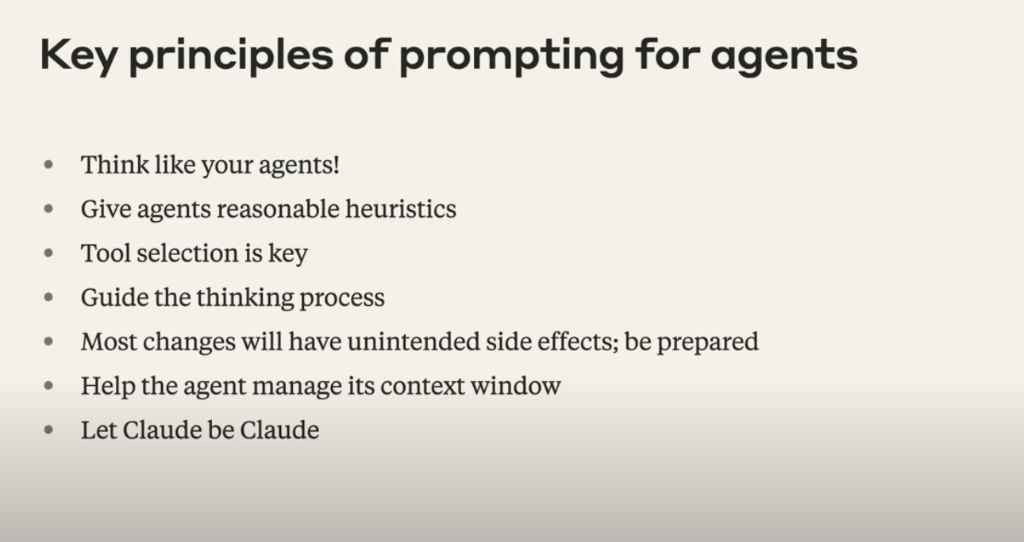
Principle 1: Think like your agents
This is the most important principle. You need a mental model of the agent's world: the tools it has access to, the environment it operates in, and the responses it receives from those tools.
"You need to think like your agents. This is maybe the most important principle."
Walk through the task yourself. If a human would not understand what to do under the same constraints, the model will not understand either.
Principle 2: Give reasonable heuristics
Prompting is also a form of conceptual engineering. You are teaching the model a set of concepts and behavioral rules so it can perform better in a specific environment.
It is similar to managing a new intern. You need to state the general principles clearly.
Some principles the Anthropic team gave Claude Code include:
- Irreversibility: Because Claude Code can directly modify files in a user's environment, it is taught to avoid actions that may cause irreversible damage.
- Stopping condition: In research-style tasks, models may continue searching even after they already found the answer. Sometimes you must tell the agent explicitly: stop once the answer is found.
- Budget: Give the model a tool-call budget, such as "simple queries should use fewer than five tool calls."
Principle 3: Tool selection is key
The model does not automatically know which tool is best in which context. You need to give explicit guidance.
"You have to give it explicit principles about when to use which tools and in which contexts."
One common mistake is to give the model a pile of tools plus a short description and then wonder why it chose the wrong one. The root problem is often that the model was never told what should happen in that specific situation.
At the same time, the model's action space is limited. Too many tools increase confusion and make wrong tool calls more likely. That is why tool simplification and masking unavailable tools can be so useful.
Principle 4: Guide the thinking process
You can prompt the agent to think better, not just to act.
Examples:
- Plan first: Ask the model to assess task complexity, estimate how many tool calls are needed, identify which sources to inspect, and define what success looks like.
- Reflect on results: Ask the model to reflect on outputs such as search results before treating them as fact, for example by inserting a step like
reflect on the quality of the search results.
Principle 5: Expect unintended side effects
Agents operate in a loop, which makes them harder to predict than a single completion. Any change to the prompt can create second-order effects.
For example, if you tell the agent to "keep searching until you find the highest-quality source," it may end up trapped in an endless loop because the perfect source does not actually exist.
Principle 6: Help the agent manage its context window
Long-running tasks can still hit context limits. You need strategies for expanding the agent's effective context.
Common strategies include:
- Compaction: When context gets close to the limit, summarize the full state and hand that summary to a fresh model instance. Claude Code does this, and Manus Inherit does something similar.
- Write to external files: Persist memory or state outside the context window.
- Use sub-agents: Let a main agent orchestrate smaller agents that complete sub-tasks and return compressed results.
Principle 7: Let Claude be Claude
Claude is already good at behaving like an agent. The best pattern is often to start with a bare-bones prompt and bare-bones tools, observe where it fails, and then iterate from real failures instead of over-specifying everything from the start.
"I would recommend just trying out your system with sort of a bare bones prompt and barebones tools and seeing where it goes wrong and then working from there. Don't sort of assume that Claude can't do it ahead of time because Claude often will surprise you with how good it is."
Tool Design
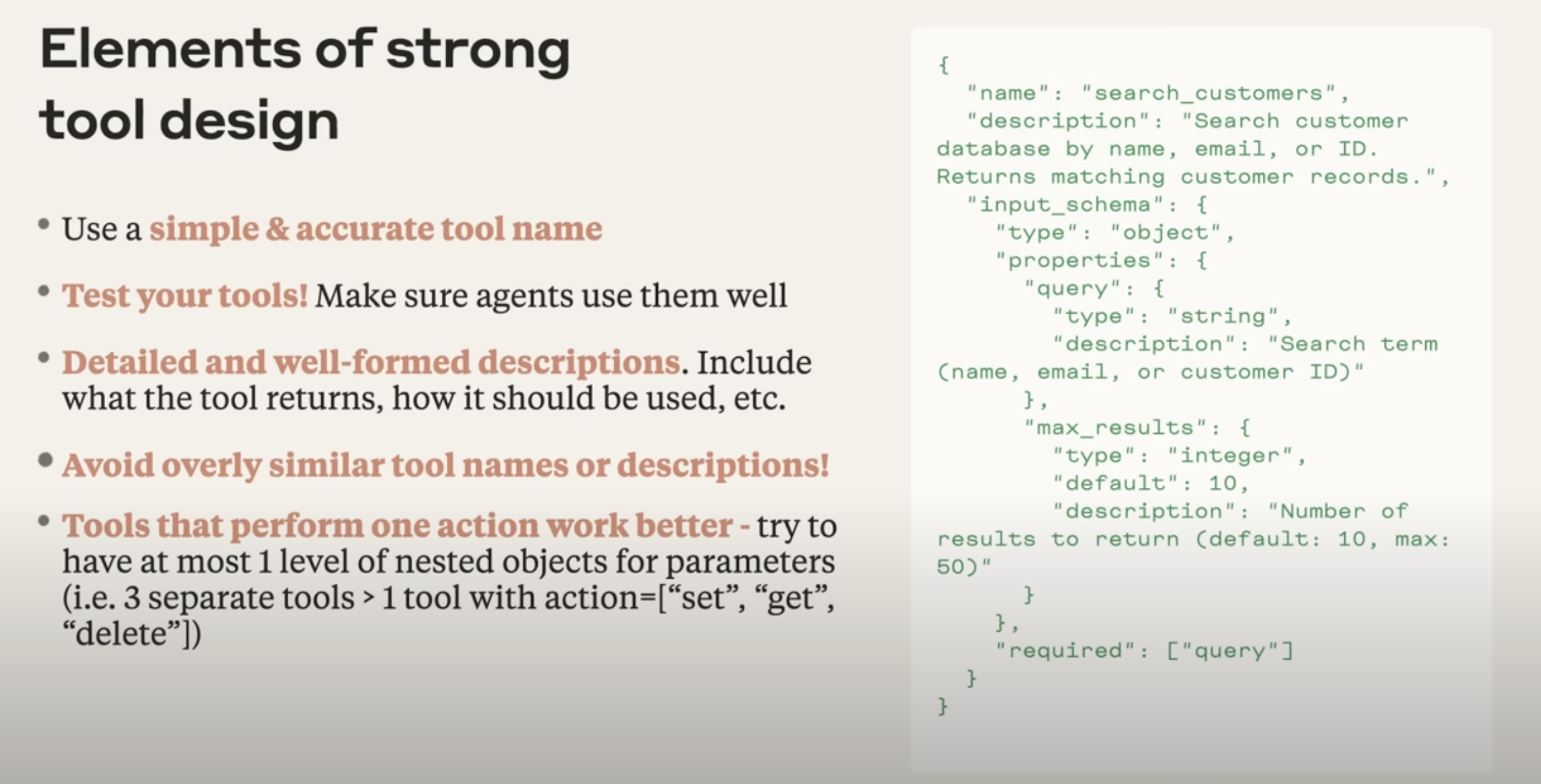
Whether an agent can select and use tools correctly depends heavily on the quality of the tools themselves. A well-designed tool should satisfy the following requirements:
- Use simple and accurate names: A name should directly reflect the core function. For example,
search_customersis clearer thanretrieve_data. - Test your tools: A tool should not only work in isolation. You also need to test whether the agent can reliably call it and interpret the result.
- Write detailed, well-formed descriptions: A good description should explain what the tool returns, when it should be used, and what each parameter means. Think of it as documentation for another engineer.
- Avoid overly similar tools: If multiple tools look almost the same, such as six search tools that differ only by backend, they will confuse the model. Merge them whenever possible.
- One action per tool is usually better: Follow the single-responsibility principle. Instead of one overloaded tool that handles
set,get, anddelete, split them intoset_data,get_data, anddelete_data.
Evals, Evals, Evals
Evals are the key mechanism for systematically measuring progress in any AI system. Without a meaningful evaluation framework, you cannot tell whether changes to your system actually improved anything.
Agent evaluation is harder than evaluation for traditional AI tasks because agent runs are long-horizon and their trajectories are not always predictable.
Practical tips for evaluating agent systems
1. Bigger effect sizes require fewer samples
At the beginning, you only need a small test set, in other words, a minimum viable eval set. Early changes usually produce large and visible shifts. If an improvement is obvious, you do not need hundreds of samples to prove it. Avoid building a giant, fully automated evaluation framework on day one. That is a common anti-pattern.
2. Use realistic tasks
Evaluation tasks should reflect real user scenarios as closely as possible. Ideally, they should have a clear answer that can actually be found through the tools available to the agent.
3. Use LLM-as-judge well, and provide a clear rubric
Modern LLMs are strong enough to serve as useful judges, as long as you provide a rubric that is explicit and aligned with human judgment.
4. Human evaluation is irreplaceable
Automated evaluation cannot fully replace human judgment. In the end, nothing beats pressure-testing the system and doing direct vibe checks with real users. That is how you catch the rough edges that automated evals miss.
Concrete examples of agent evaluation
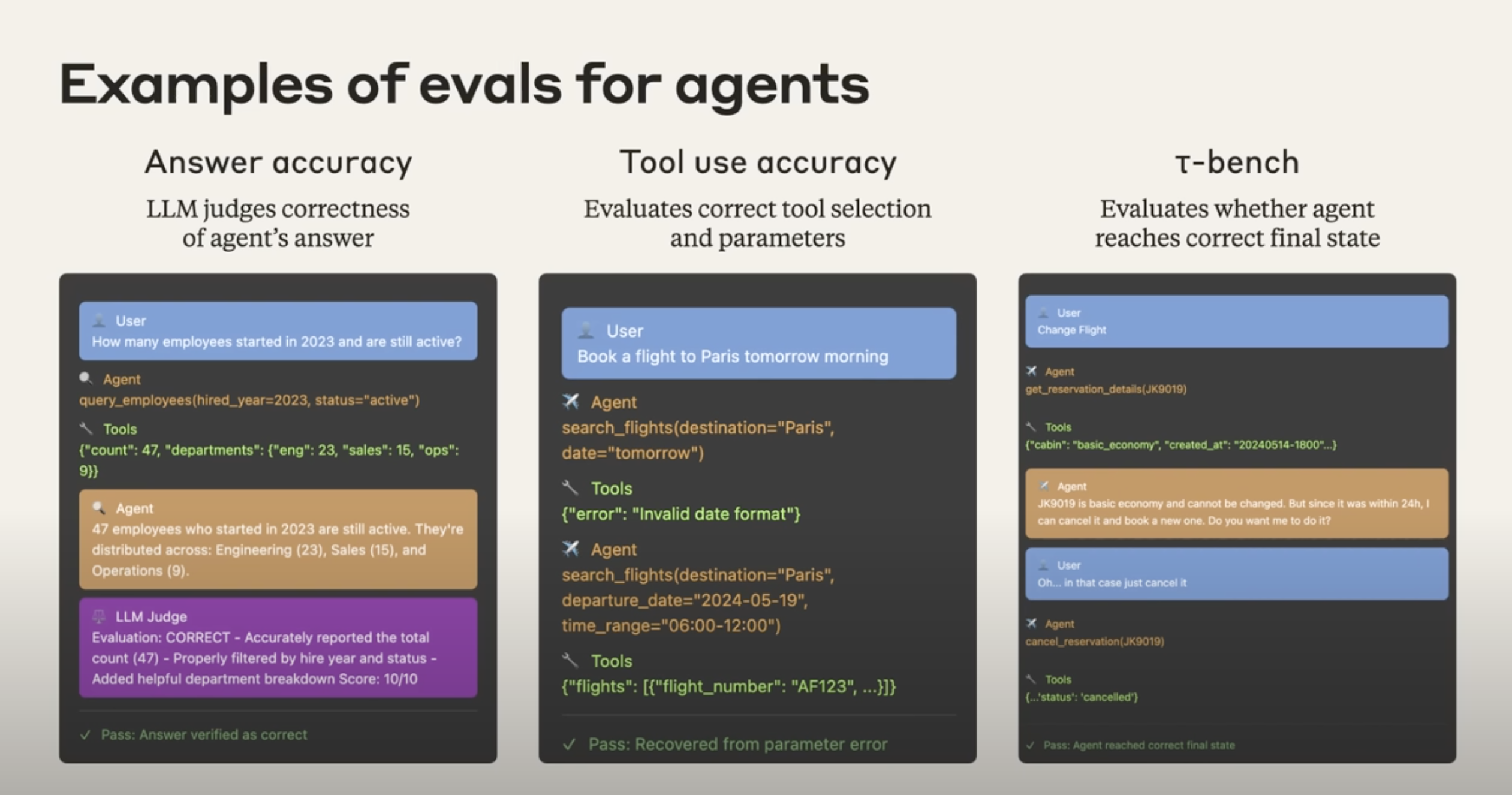
1. Answer accuracy
- Goal: Judge whether the agent's answer is correct.
- Workflow:
- A user asks a question, for example: "How many employees joined in 2023 and are still employed?"
- The agent calls a tool such as a database query and gets the raw data.
- The agent turns that result into a natural-language answer.
- An LLM judge scores the answer using a rubric and can explain why it is correct or incorrect.
- The final output is a pass or fail signal.
2. Tool-use accuracy
- Goal: Evaluate whether the agent chose the right tool and the right parameters.
- Workflow:
- A user says, "Book me a flight to Paris tomorrow morning."
- The agent tries to call
search_flights, but uses an invalid parameter such asdate="tomorrow". - The tool returns an error such as "invalid date format."
- The key evaluation question is whether the agent can understand the error and recover by retrying with a valid parameter such as
departure_date="2024-05-19". - A pass may mean the agent successfully repaired the failed attempt.
3. Final-state evaluation with tau-bench style tasks
- Goal: Evaluate whether the agent reached the correct final external state.
- Workflow:
- A user requests a state-changing action, such as changing a flight booking.
- The agent discovers the booking cannot be changed directly and must instead be canceled and rebooked.
- The user confirms the action.
- The agent calls
cancel_reservation. - The key question is not what the dialogue looked like, but whether the final state in the system is correct, for example whether the booking record in the database is actually marked
cancelled. - If the final state is correct, the eval passes.